ReaScript入门:Lua表结构与音效项目管理
- 2026-09-24 20:42:06

本文作者:辰谙
在音效制作中,我们常需管理大量音频资源(如上百个音效文件),此时仅靠简单变量会显得力不从心。本文将介绍Lua的核心数据结构——表(Table),并展示如何用它高效管理音效项目。
01
为什么需要表结构?
在音效制作流程中,我们面对的不是孤立的音频文件,而是具有复杂关联的资源集合。举个例子,一个完整的脚步声资源包可能包含以下数据:
文件名:footstep_grass_01.wav
路径:D:/SFX/Footsteps/
响度:-23.5 LUFS
分类:environment
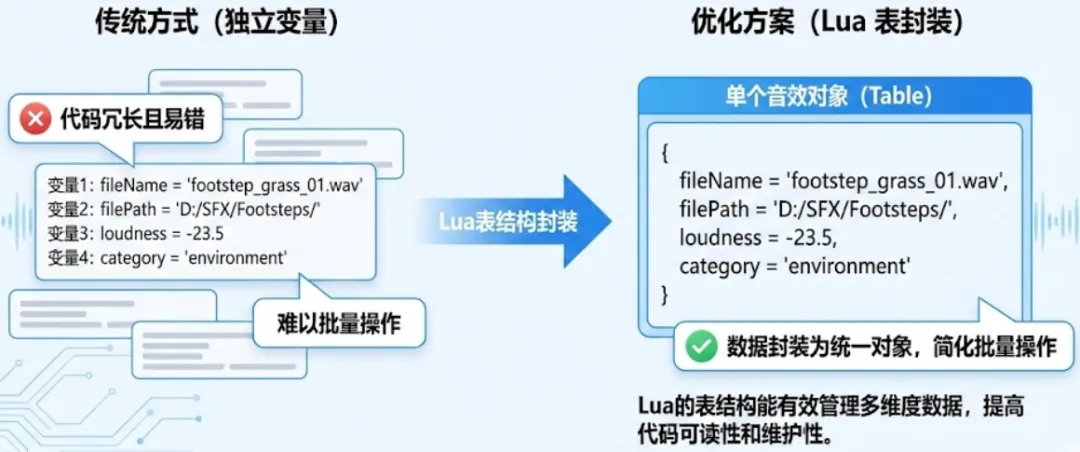
如果使用传统的一个变量存储一个数据的方式,我们需要声明多个独立变量,这在处理大量资源时会变得非常混乱。
而Lua的表结构可以将这些相关的数据封装为一个统一的逻辑单元,大大简化数据管理复杂度。表结构不仅使代码更加清晰,还能通过循环遍历实现批量操作,显著提升脚本效率。
02
Lua表基础:定义与操作
表是Lua中唯一的数据结构,但它非常灵活,可以同时模拟数组、字典、对象等多种数据结构。理解表的基本操作是掌握ReaScript高级应用的关键。
表的基本定义使用花括号{},其中可以包含任意类型的元素。在音效管理场景中,我们通常有两种定义方式。其中,列表式表(类似数组)适合存储同类型元素的集合,比如一系列音效文件名;键值对表(类似字典)适合存储具有属性的复杂对象,比如单个音效的完整信息:
-- 列表式表:存储音效文件名local sound_list = {"gunshot.wav", "explosion.wav", "footstep.wav"}-- 键值对表:存储音效属性local sound_props = {name = "laser_beam",path = "sfx/weapons/laser_beam.wav",volume = -12.0,duration = 3.5,category = "weapon"}
掌握表的基本操作是实际应用的前提。以下是表的读写与遍历:
-- 读写数据sound_props.volume = -10.0 -- 修改音量print(sound_props.category) -- 输出分类-- 遍历列表for i, filename in ipairs(sound_list) doreaper.ShowConsoleMsg("音效 ".. i ..": ".. filename .."\n")end-- 遍历键值对for key, value in pairs(sound_props) doreaper.ShowConsoleMsg(key .." = ".. tostring(value) .."\n")end
03
ReaScript与表结合实战
将Lua表与REAPER API结合,可以解决音效管理中的实际问题。REAPER的许多API函数返回的数据本身就适合用表结构来组织和管理。
案例一是收集音效项数据至表。以下脚本将选中音效项的名称、长度、路径存入表,并生成报告:
function collect_sound_data()local selected_count = reaper.CountSelectedMediaItems(0)if selected_count == 0 thenreaper.MB("请先选中音效项", "提示", 0)returnend-- 创建表存储所有音效数据local sound_data_table = {}for i = 0, selected_count - 1 dolocal item = reaper.GetSelectedMediaItem(0, i)local take = reaper.GetActiveTake(item)if take and not reaper.TakeIsMIDI(take) then-- 为每个音效创建子表local sound_info = {name = reaper.GetTakeName(take),length = reaper.GetMediaItemInfo_Value(item, "D_LENGTH"),path = reaper.GetMediaItemTake_Source(take) -- 获取文件路径}table.insert(sound_data_table, sound_info) -- 插入主表endend-- 生成报告reaper.ShowConsoleMsg("=== 音效数据报告 ===\n")for i, data in ipairs(sound_data_table) doreaper.ShowConsoleMsg(string.format("%d. %s | 长度: %.2f秒\n", i, data.name, data.length))endendcollect_sound_data()
这个脚本的价值在于它将分散的音效信息组织成了结构化的数据,为后续的批量处理奠定了基础。在实际应用中,我们可以基于这个数据表进行排序、筛选、导出等操作。
案例二是使用嵌套表实现音效智能分类。对于大型音效项目,自动分类是提高效率的关键。嵌套表可实现多级分类,如根据关键词自动分配音效到对应轨道:
-- 定义分类规则表local category_rules = {weapon = {"gun", "explosion", "laser"},footsteps = {"step", "walk", "run"},environment = {"wind", "rain", "ambience"}}function auto_categorize_sounds()local items = {}-- 收集选中音效项local selected_count = reaper.CountSelectedMediaItems(0)if selected_count == 0 thenreaper.MB("请先选中至少一个音效项", "提示", 0)returnendfor i = 0, selected_count - 1 dolocal item = reaper.GetSelectedMediaItem(0, i)local take = reaper.GetActiveTake(item)if take thentable.insert(items, {item = item,name = reaper.GetTakeName(take):lower() -- 转为小写便于匹配})endend-- 创建分类结果表local categorized = {}for category, _ in pairs(category_rules) docategorized[category] = {} -- 每个分类初始化为空表end-- 分类逻辑for _, sound in ipairs(items) dolocal found = falsefor category, keywords in pairs(category_rules) dofor _, keyword in ipairs(keywords) doif string.find(sound.name, keyword) thentable.insert(categorized[category], sound)found = truebreakendendif found then break endendend-- 输出结果前清空控制台reaper.ClearConsole()-- 输出结果local total_processed =0for category, sounds in pairs(categorized) doreaper.ShowConsoleMsg(category .. " 类音效: " .. #sounds .. " 个\n")total_processed = total_processed + #soundsendreaper.ShowConsoleMsg("总计处理: ".. total_processed .." 个音效\n")end-- 关键:添加这行代码来实际执行函数auto_categorize_sounds()
这个分类系统的优势在于其可扩展性。当需要添加新的分类时,只需在category_rules表中添加相应的关键词即可,无需修改核心逻辑。
04
智能音效库加载器
为了综合运用表结构的知识,我们创建一个实用的音效库加载脚本。这个脚本模拟从外部数据源读取音效信息,并自动在REAPER中创建相应的轨道和音频项:
function load_sound_library()local sound_library = {{name = "gunshot",path = "D:/SFX/weapons/gunshot.wav",volume = 0.8},{name = "footstep",path = "D:/SFX/footsteps/concrete.wav",volume = 1.0},{name = "ambient_wind",path = "D:/SFX/environment/wind.wav",volume = 0.6}}reaper.Undo_BeginBlock()reaper.PreventUIRefresh(1)local success_count =0local time_position =0for _, sound in ipairs(sound_library) do-- 更严格的文件存在性检查local file = io.open(sound.path, "r")if not file thenreaper.ShowConsoleMsg("❌ 文件不存在: ".. sound.path .."\n")goto continue -- 跳过这个音效endfile:close()-- 取消选择所有轨道,避免导入到错误轨道reaper.Main_OnCommand(40297, 0) -- 命令ID 40297 = 取消选择所有轨道-- 创建新轨道local track_index = reaper.GetNumTracks()reaper.InsertTrackAtIndex(track_index, false)local track = reaper.GetTrack(0, track_index)if not track thenreaper.ShowConsoleMsg("❌ 无法创建轨道: ".. sound.name .."\n")goto continueend-- 命名轨道reaper.GetSetMediaTrackInfo_String(track, "P_NAME", sound.name, true)-- 设置导入位置并确保轨道被选中reaper.SetEditCurPos(time_position, false, false)reaper.SetOnlyTrackSelected(track, true) -- 确保只选中当前轨道-- 导入媒体文件local retval = reaper.InsertMedia(sound.path, 1) -- 1=不显示导入对话框if retval then-- 短暂延迟以确保媒体项加载(针对大型文件)reaper.defer(function()end) -- 强制UI更新-- 检查轨道上是否有媒体项local item_count = reaper.CountTrackMediaItems(track)if item_count > 0 then-- 导入成功,设置音量local item = reaper.GetTrackMediaItem(track, 0)if item thenreaper.SetMediaItemInfo_Value(item, "D_VOL", sound.volume)-- 更新时间轴位置local item_length = reaper.GetMediaItemInfo_Value(item, "D_LENGTH")time_position = time_position + item_length + 2.0success_count = success_count + 1reaper.ShowConsoleMsg("✅ 成功导入: ".. sound.name .."\n")endelse-- 导入成功但没有创建媒体项,删除空轨道reaper.DeleteTrack(track)endelse-- 导入失败,删除空轨道reaper.DeleteTrack(track)reaper.ShowConsoleMsg("❌ 导入失败: ".. sound.path .." (已删除空轨道)\n")end::continue::endreaper.PreventUIRefresh(-1)reaper.Undo_EndBlock("加载音效库", -1)reaper.MB(string.format("处理完成!", success_count, #sound_library), "结果", 0)end-- 执行函数load_sound_library()
05
总结
表的优势在于统一管理复杂数据,减少重复代码,提升脚本可读性,在批量属性修改、动态分类、资源报告生成等方面都有用途。
通过本文的学习,我们可以看到Lua表结构在ReaScript音效管理中的强大作用。表结构不仅使数据组织更加清晰,还通过统一的接口简化了复杂操作。掌握表结构后,我们的ReaScript编程能力将迈上新的台阶,能够应对更加复杂的音效生产需求。

游戏音频技术丨游戏音效的文件格式丨游戏音频效果器丨游戏音频设计中的声学效应丨合成器丨
REAPER&ReaScript丨ReaScript丨流程、变量、if逻辑和API丨SWS Extension丨循环结构与批量处理丨字符串处理与正则表达式

